Back
Categories
Instagram Shadowban: How to Check and Recover Your Reach
Marion Carneiro
The Instagram shadowban is real, but 80% of what you read about it is wrong. Here is how to check in 3 minutes whether your reach is restricted, what really causes it and how to get out without making things worse.
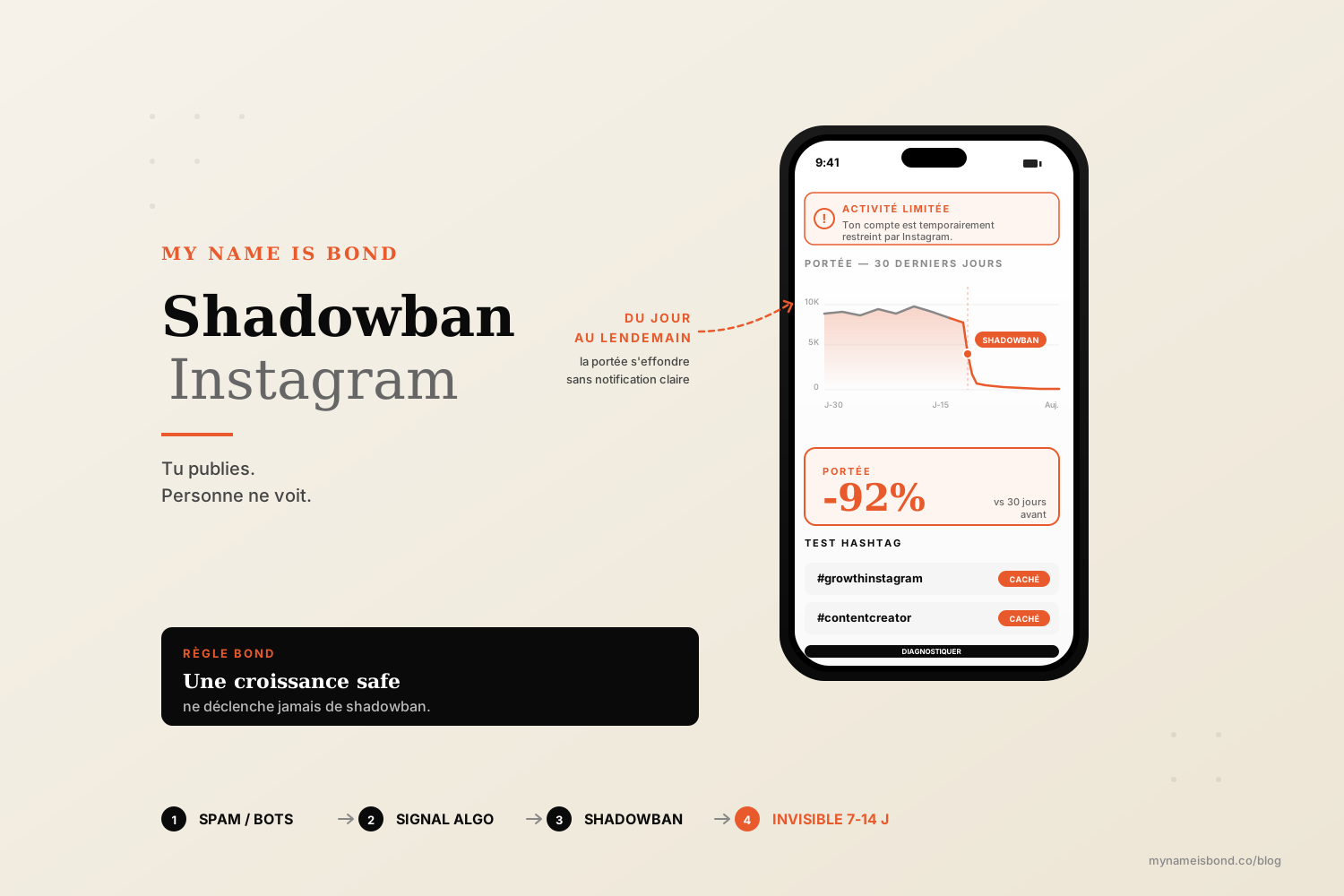
Your reach is collapsing.
You search "Instagram shadowban" on Google.
You find 50 articles that contradict each other: it exists, it doesn't, it's hashtags, it's third-party apps, it's nothing, it's everything. No clear way to check. No fix that works.
This guide separates fact from fiction. The shadowban is real in 2026, but 80% of what people say about it is urban legend. Real algorithmic restriction is specific and measurable, and most of the time it is linked to spam behavior you can easily avoid. We will look at how to check in 3 minutes whether your reach is really restricted, identify the real causes and get out cleanly without making things worse.
What is an Instagram shadowban?
A shadowban (sometimes called a "silent ban" or "account restriction") is an invisible limit on an Instagram account's reach. You post as usual, your account is not suspended and you haven't received any notification, but your content no longer appears in discovery tabs (Explore), is no longer indexed under hashtags, or is no longer shown to people who don't follow you.
Officially, Meta does not use the word "shadowban". The company publicly acknowledged in 2022 that visibility reduction mechanisms exist, and even added an "Account Status" feature (menu, Settings and activity, then Account Status) that tells you whether your account is restricted.
In 2026, a real shadowban takes two main forms:
1. Discovery restriction. Your posts are still shown to your current followers but are no longer pushed to accounts that don't follow you. Your Reels no longer appear in the Reels tab of users outside your audience. Your posts no longer show up on hashtag pages. As a result, your reach hits a ceiling and your growth stops.
2. Hashtag restriction. More specific. Instagram considers some of the hashtags you use "abusive" or banned. Any post containing these hashtags has its reach reduced. This is the best documented form of shadowban, and the easiest to diagnose.
What is NOT a shadowban:
A natural drop in reach after a viral Reel (regression to the mean).
A period of low reach because your content is weaker or less regular.
An algorithm change that affects everyone.
Your followers seeing fewer of your posts (that is how the feed normally works).
80% of accounts that cry shadowban just have a content quality or timing problem. A real shadowban is rarer and has specific signs.
Signs of an Instagram shadowban
Five concrete signals that distinguish a real restriction from a natural drop in reach.
1. A sharp, sudden drop.
A shadowban hits all at once, not gradually. You post as usual, and overnight your reach drops by 60 to 90% across all your formats. Not just one Reel that flopped. All your posts, all your Reels, your Stories included. If the decline is gradual, it is probably a content or timing problem.
2. Your hashtags no longer bring in any visitors.
In Insights, look at where the views on your last 10 posts came from. If the "Hashtags" share has dropped from 15 to 30% to 0 or 1%, that is a very strong sign of a hashtag restriction.
3. Your posts don't appear on hashtag pages.
A simple test: publish a post with a specific hashtag (for example #mypostjune4th2026), wait 5 minutes, log out of Instagram and search for this hashtag from another account or as a guest. If your post doesn't appear in "Recent", you have a hashtag restriction.
4. Explore no longer pushes your Reels.
You post a Reel. After 24 hours, you compare its stats with your previous 5 Reels. If views are divided by 5 to 10 across all your latest Reels and 95% of your reach comes from your followers (no more "Non-followers" in the source), you have a discovery restriction.
5. The "Account Status" screen shows a restriction.
Open the menu (Settings and activity), then Account Status, under "More info and support". Instagram tells you there whether your content is eligible for recommendation. If the screen says "Your content currently isn't eligible to be recommended", that is an official shadowban, declared by Instagram itself. It is the clearest proof.
If you tick 2 or 3 of these signals, you are probably shadowbanned. If you only tick one, it is more likely another problem.
How to check if you're shadowbanned on Instagram
Three methods to cross-check the diagnosis in under 5 minutes.
Method 1: the hashtag test.
Publish a post with a unique, made-up hashtag (e.g. #testbondjune4th2026).
Wait 5 to 10 minutes.
Open Instagram on another device or in a private browser window and search for this hashtag.
If your post appears, your hashtags work. If it doesn't, the hashtag restriction is confirmed.
Method 2: check Account Status.
Open the menu (Settings and activity), then Account Status, under "More info and support".
Read what Instagram tells you. The platform states explicitly whether your account is eligible for recommendation and lists the posts that triggered a restriction.
It is the most official and reliable method since Instagram rolled out this feature at the end of 2022.
Method 3: view sources in Insights.
Go to Insights for your last 10 posts.
For each post, look at the split of views between "Followers" and "Non-followers".
On a healthy account in 2026, an average post gets 20 to 40% of its views from non-followers. A strong Reel can reach 70 to 90%.
If your last 10 posts all show 95 to 100% of views from followers (and 0 to 5% from non-followers), you are no longer being distributed beyond your audience. That is a discovery shadowban.
Cross-check these 3 methods. If all 3 confirm it, the diagnosis is solid.
What really causes a shadowban
This is where we separate fact from fiction. Seven real causes, from most to least likely.
1. Using banned or problematic hashtags (the most common).
Instagram keeps a list of hashtags considered abusive, spammy or linked to sensitive content. The list changes over time and is not public. Seemingly innocent hashtags can be on it (for example #adulting, #pushup and #brain have all been flagged at different times). A single banned hashtag among your 30 tags is enough to penalize the whole post.
How to check a hashtag: type it into Instagram's search bar. If it appears with a post count AND you can tap through to see the posts, it is fine. If it appears without a count, if you can't access the posts, or if you see the message "Recent posts from [hashtag] are currently hidden", it is restricted.
2. Using unauthorized third-party apps (a major and underestimated cause).
Apps that automate likes, follows, comments, DMs or unfollows are all considered spam by Instagram. Combin, Jarvee, Followliker and dozens of other tools have been detected on a large scale, and their users shadowbanned. A single 24-hour session of auto-following can be enough to trigger a 4 to 6-week restriction.
To see what is allowed and what isn't in 2026, we reviewed all the tools here: 5 Instagram automation tools that won't get you shadowbanned.
3. Buying followers, likes or comments.
Instagram detects artificial spikes and penalizes them systematically. An order of 5,000 followers for 30 euros can cost you 2 to 6 months of reduced reach. More on the subject: social media bots and how Instagram hunts them down.
4. Manual spam behavior.
Too many actions in a row are as suspicious as automated actions. If you follow 200 accounts in 1 hour, like 100 posts in 5 minutes or send the same DM to 50 people in 30 minutes, the algorithm flags you. Stay under 30 actions per hour, and never repeat identical actions in a series.
5. Repeated reports from other users.
If several people report your account or your posts (rightly or wrongly), Instagram can apply a preventive restriction. This happens more often to accounts that cover divisive topics.
6. Content that breaks the Community Guidelines.
Sensitive topics, partial nudity, violence, misinformation, hate speech, false commercial promises. One reported post judged problematic can lead to a restriction on the whole account.
7. A sudden change in the account's behavior.
If you post 5 times a month for 6 months and then suddenly post 50 times in 3 days, the algorithm sees that as suspicious. The same goes for switching niche overnight. Regular behavior is easy to read. Sudden breaks draw attention.
How to fix an Instagram shadowban
The method that works in 2026, in order.
Step 1. Stop everything. Really everything.
The most common mistake that makes things worse: "I'll post more to catch up." That is exactly the wrong move. If you post more during a shadowban, you confirm to the algorithm that you are a spammer.
Take a complete break of 48 to 72 hours. No posts. No likes. No follows. No comments. No third-party apps. Nothing. Let your account "rest" so Instagram sees human behavior again.
Step 2. Clean up what is causing the problem.
During the break:
Remove suspicious hashtags from your last 5 posts. You can edit the caption of a published post. Cut down to 5 to 8 very niche, verified hashtags.
Disconnect all third-party apps from your Instagram account. Settings, then Security, then Apps and websites. Revoke access for anything you don't actively use and that could be an automation tool.
Turn off any automated growth services you were using (follow/unfollow services, automated like pods or comment pods).
Remove the most obvious bots from your follower list with the "Remove follower" option (50 per day maximum).
Step 3. Start again with clean, compliant content.
After the 72 hours, start again by publishing a single quality post, with no problematic hashtags and 5 to 8 very precise tags. Watch the view sources in Insights over the next 48 hours.
Step 4. Keep going for 2 to 4 weeks.
Keep posting regularly (1 post every 2 to 3 days, no more during the recovery phase). Avoid all risky behavior. Reach comes back gradually, usually within 14 to 42 days depending on how severe the initial restriction was.
Step 5. If nothing changes after 6 weeks.
Report it to Instagram through "Settings, then Help, then Report a problem", explaining that your account has had abnormally low reach since [date]. There is no guarantee of a reply, but it sometimes gets your case to a human team.
Avoiding it again: safe growth (Bond's approach)
The best way never to be shadowbanned is to build growth that never uses the mechanisms that trigger a restriction.
All the practices that cause a shadowban have one thing in common: they try to cheat with volume. Buying followers. Automating follows. Spamming hashtags. Anything that tries to save time by simulating human behavior at scale.
Bond's approach does the opposite: qualified growth, one signal at a time, content designed to be saved, and conversion through DMs. No action that looks like spam to Instagram. Zero bans since 2020 on the accounts we work with.
This is exactly what we deploy in organic Instagram growth: no ads, no bought followers, no aggressive automation. A cleanly built funnel of qualified DMs that goes unnoticed by all of Instagram's detectors because there is nothing to detect.
If you want your organic reach to grow without ever triggering a restriction, this is the protocol to follow.
FAQ
How do I know if I'm shadowbanned on Instagram?
The most official method in 2026: open the menu (Settings and activity), then Account Status, under "More info and support". Instagram states there whether your content is eligible for recommendation and lists the posts that triggered a restriction. In addition, do the hashtag test: publish a post with a unique hashtag (for example #mytestjune4th2026), wait 10 minutes and search for this hashtag from another account or in a private browser window. If your post doesn't appear, you have a hashtag restriction. Cross-check with view sources in Insights: if your last 10 posts show 95 to 100% of views from followers (and 0 to 5% from non-followers), you are no longer being distributed beyond your audience.
How long does an Instagram shadowban last?
It depends on how serious the cause is. For a restriction linked to problematic hashtags with no other violation: 14 to 21 days once the hashtags are removed. For a restriction linked to automation apps: 4 to 6 weeks after you completely stop using the tool. For a restriction linked to bought followers or repeated manual spam: 2 to 6 months, sometimes longer if you do it again during that period. The best strategy is to take a 48 to 72-hour break immediately, clean up every possible cause, then publish healthy content at a human pace for 4 to 6 weeks.
Can hashtags cause a shadowban?
Yes, it is actually the most common cause. Instagram keeps a changing list of hashtags considered spammy, abusive or linked to sensitive content. The list changes constantly and is not public. A single banned hashtag among your 30 tags is enough to penalize the whole post, or even the whole account if you reuse that hashtag several times in a row. To check a hashtag, type it into Instagram's search bar. If it shows a post count and you can see recent posts, it is fine. If it shows no count or the message "Recent posts from [hashtag] are currently hidden", it is restricted and you should avoid it.
How do I get rid of an Instagram shadowban?
In order:
Stop all activity on the account for 48 to 72 hours (no posts, likes, follows or active third-party apps).
Edit your last 5 posts to remove all suspicious hashtags, and cut down to 5 to 8 very niche, verified hashtags.
Disconnect all third-party apps from your account (Settings, then Security, then Apps and websites).
Start again gradually with a single quality post with no problematic hashtags.
Keep posting regularly (1 post every 2 to 3 days) for 4 to 6 weeks, avoiding any risky behavior. Reach usually comes back within 14 to 42 days. If nothing changes after 6 weeks, report it through Instagram's help form.
Instagram growth
securely and simply.
Save time.
Acquire new customers.
Boost your growth now.