Back
Categories
Instagram Bio: Examples and a Structure That Converts (2026)
Marion Carneiro
Most Instagram bios try to look nice, and that is exactly why they do not convert. Here is the 3-line structure, how to use keywords in your profile name, and the CTA that brings in qualified DMs.
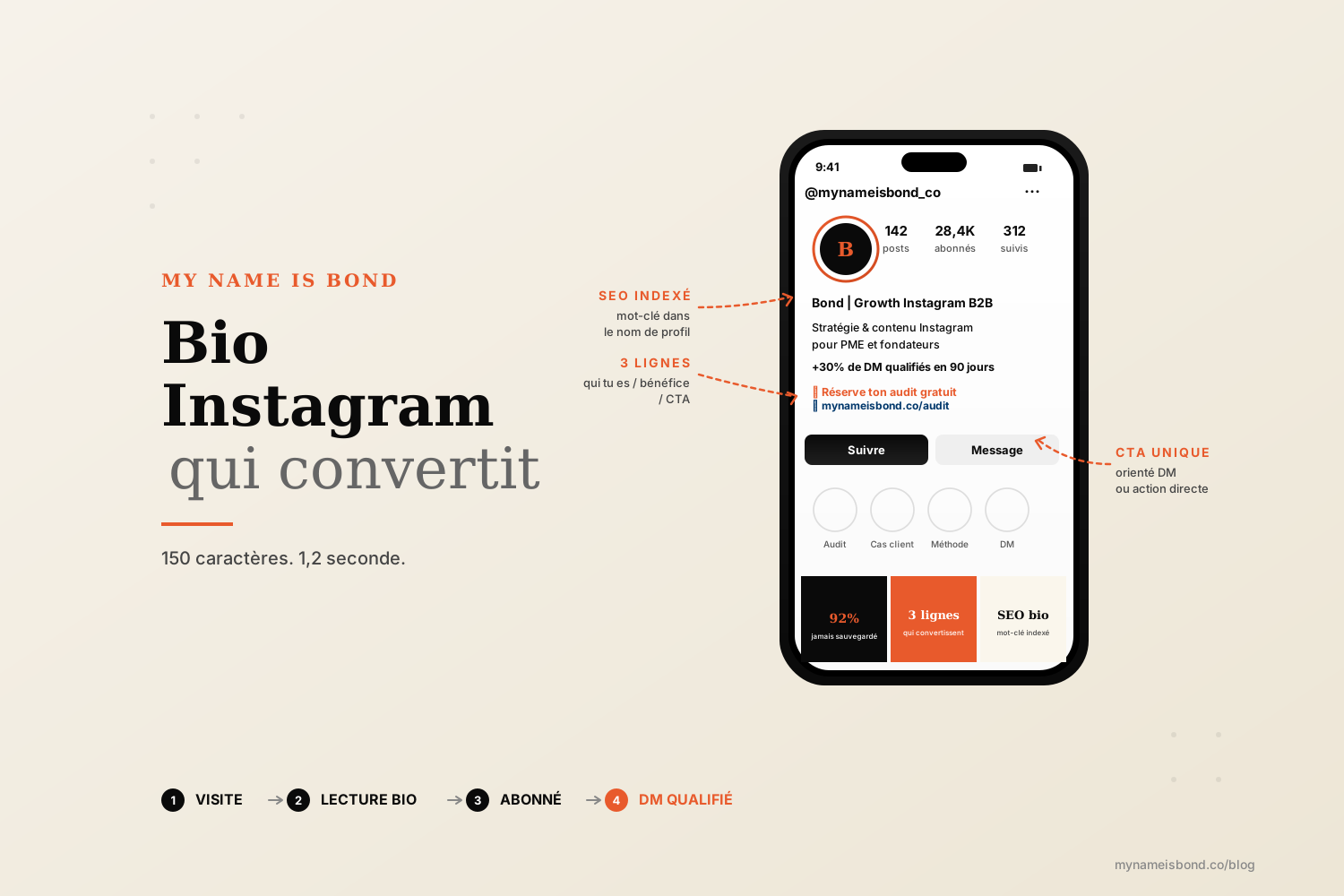
150 characters and about 1.2 seconds of reading time on average.
That is what Instagram gives you to turn a profile visit into a qualified follower.
Most Instagram bios try to look nice: a string of emojis, an inspirational quote, a stack of job titles. As a result, they say nothing, show up in no searches and trigger no action. Your Instagram bio is a conversion point, the first step of your funnel, and it should be written that way.
This is a practical guide. We start with the exact definition of the format, go through the 3-line structure that converts, cover keywords in your profile name (the most underused lever), work on the link and the CTA, and finish with the Bond method that turns a profile visit into a qualified DM.
What an Instagram bio is and why it matters so much
Your Instagram bio is the block of text at the top of your profile, under your name and follower count. It is limited to 150 characters, including spaces and emojis. It appears as soon as someone lands on your profile, whatever brought them there: Instagram search, a story, a Reel, a mention or an external link.
It is the only element that 100% of visitors see before deciding whether to follow you. Your grid and your latest Reels come after it.
That is exactly why it matters so much.
A Hootsuite study from late 2024 found that the average time spent on an Instagram profile before deciding to follow or leave is 1.2 seconds. In 1.2 seconds, the visitor reads your name and bio, glances at your profile picture and decides. If your bio says nothing specific, they keep scrolling.
The good news: 90% of accounts write theirs badly. So a well-structured bio automatically puts you ahead of most of the noise.
Before working on the bio itself, keep in mind that it is part of a wider set of profile signals (photo, name, highlights, the first row of your grid). For the full picture, see our guide: how to create an attractive Instagram page.
The 3-line structure (who you are, the benefit, the CTA)
A bio that converts fits in 3 lines.
Each line has a specific job. If you mix them up, you lose the reader. If you skip one, you lose the conversion.
Line 1: who you are and who you help.
This is the identification line. It answers one question: "Am I in the right place?" State your role and the audience you serve. Be precise and name your audience, rather than writing something like "Passionate entrepreneur".
Examples:
"Instagram growth for coaches and creators"
"Content strategy for B2B SaaS founders"
"Vegetarian meals for busy families"
The visitor knows in 0.3 seconds whether it is for them.
Line 2: the benefit or the promise.
This is the value line. It answers one question: "What do I get from following you?" State a specific result, a distinctive format or a measurable transformation.
Examples:
"Double your account in 90 days without ads"
"1 carousel a week to sell without chasing leads"
"Quick recipes, pantry ingredients, no guilt"
The visitor knows why you are useful to them.
Line 3: the CTA and the link.
This is the conversion line. It answers one question: "What is the next concrete step?" Ask for one action, connected to a link.
Examples:
"👇 Get the free template"
"👇 Book your discovery call"
"👇 This week's menu"
Use a single CTA, not three stacked on top of each other.
This structure fits in 130 to 145 characters, which leaves you some room. If it runs over, cut words instead of adding more.
Instagram bio SEO (a keyword in your profile name)
This is the most underused lever on Instagram in 2026, and one of the most profitable.
Instagram has its own search engine. When someone types "yoga coach Paris" in the search bar, the algorithm surfaces accounts based on an index.
The indexed field is your profile NAME, not your @username.
Your profile name is the bold text shown just above your bio. It can be up to 30 characters long, you can change it at any time, and Instagram's search engine reads, indexes and ranks it.
It is the only field on Instagram with real search value, and 80% of accounts just put their first name in it.
How to use it properly.
Your profile name should include a keyword your prospects use to find you: a term they actually type in the search bar, rather than a creative job title.
Examples:
"Marion | Instagram Growth"
"Julien Yoga Coach Paris"
"Camille | Easy Vegan Recipes"
You keep your first name (to stay human) and add the keyword (to be found).
Hashtags in your bio.
Instagram lets you add clickable hashtags to your bio. They link to the hashtag page, but they do nothing for your profile's search ranking. A hashtag in your bio does not increase your chances of being found in search. It just takes up space in your 150 characters. Avoid them.
Mentioned accounts (@account) in your bio.
Mentioning an account (your second brand, your co-founder, your media outlet) adds a clickable outbound link. It is useful if you run several connected accounts or want to credit a partner. Use it sparingly: every mention is a click that takes people away from your profile.
For a complete overview of Instagram SEO beyond the bio, see: optimize your Instagram presence with SEO.
The link and the CTA (link in bio, DMs)
The link in bio is one of only two places where you can take people out of the Instagram app. The other is DMs. Everything else is locked by the platform.
How many links in 2026.
Since 2023, Instagram has let you add up to 5 clickable links in your bio, directly, without a third-party tool. Go to "Edit profile" and then "Add links". The first link is shown by default under your bio. The others appear in a drop-down menu when someone taps it.
Direct link or landing page.
There are two approaches with two different goals.
A direct link to a capture page or a single product converts better because the funnel is shorter. The visitor taps, lands on the offer and acts. If you have one clear priority (a lead magnet, a flagship product, a booking page), link to it directly.
A link-in-bio page (Linktree, Beacons, Stan Store or your own page such as link.yourdomain.com) is useful when you have several real offers. It spreads attention, but it lets you guide people. If you use one, never show more than 4 options above the fold.
Our default recommendation: a direct link, unless you really have several active entry points into your funnel.
What works for a bio CTA in 2026.
"Visit my website" no longer works. It is too generic and gives no reason to click.
What works:
Free resource CTA: "👇 Get the carousel template"
Action CTA: "👇 Book your discovery call"
DM CTA: "DM me the word AUDIT for your free review"
The last one is very effective for services. It skips the external link entirely. The visitor stays in Instagram, you get the conversation straight in your inbox, and you can qualify the lead in real time.
For every type of Instagram CTA (bio, caption, story, Reel), see our full guide: the complete Instagram call to action guide.
6 best practices for a bio that converts
These six rules make the difference between a decorative bio and one that brings in qualified followers and DMs.
Clarity before looks. If you have to choose between "prettier" and "clearer", choose clearer every time.
One promise. Do not list three jobs and four passions. Pick one promise and state it clearly.
Emojis as markers. One emoji per line, at the start or the end, to guide the eye. Do not put one between every word.
The right tone for your audience. In languages with formal and informal "you", pick one: informal for young audiences and creators, formal for B2B and premium services. Do not mix them.
A bio that evolves. Update your bio with every new offer, lead magnet or pivot, about every 1 to 3 months on average.
The cold phone test. Open your profile on a phone that does not know you. Read the bio as if you were discovering the account. If you cannot tell in 2 seconds what you offer, rewrite it.
Mistakes that hurt bios (and that nobody fixes):
Inspirational quotes with no context ("Be the change you want to see")
A list of job titles ("Coach | Author | Speaker | Mom")
A bio written in a language most of your audience does not speak
No CTA, just a lonely link
Emojis that use up half of the characters
Instagram bio examples by industry
Seven patterns tested on accounts we support. Each one follows the 3-line structure, includes a keyword in the profile name and ends with a conversion CTA.
Business coach / freelancer
Content creator (Instagram growth)
E-commerce brand
Local yoga / wellness coach
Agency or B2B service
Restaurant / local shop
SaaS founder
The pattern to remember: a keyword in the profile name, a measurable or niche promise on line 2, a direct action CTA on line 3.
From profile visit to qualified DM (the Bond approach)
This is where most brands stop. They write a nice bio, admire it and never measure how well it works.
At Bond, we treat a bio like a landing page. Two metrics count: the visit-to-follower conversion rate and the follower-to-qualified-DM rate.
Here is the process we set up on the accounts we support with our Instagram strategy service:
1. The bio as a first qualification filter.
Line 1 should filter out 70% of off-target visitors. This is intentional. You do not want everyone, you want specific prospects. "Instagram growth for coaches and creators" filters out e-commerce owners and community managers in two seconds, which is healthy.
2. A bio CTA that points to DMs as well as an external link.
DMs are the only Instagram channel where the algorithm does not decide for you. A bio that says "DM me the word AUDIT" starts a direct conversation in your inbox. You capture intent at its highest point, without an external link that loses 60% of clicks along the way.
3. Conditional automation.
A tool like ManyChat detects the keyword in a DM and automatically sends a first message with a resource or a qualifying question. You do not miss any intent, even while you sleep.
4. A human conversation.
Automation stops at the second message, and then you take over manually. You ask a qualifying question ("Are you a coach, a creator or an agency?"), adapt what comes next and guide the person toward a call or a more in-depth lead magnet.
5. Tracking your bio like a page.
Measure the click-through rate on your link in bio (with Bitly, Linktree or a dedicated UTM). A/B test your line 3 every 4 weeks and keep the version that converts best.
What we see on Bond accounts: a well-structured bio with a DM-focused CTA brings 3 to 5 times more qualified conversations per month at the same traffic level, without posting more and without ads.
Your Instagram bio is the first page of your funnel, so it deserves the same care as one.
FAQ
How many characters can an Instagram bio have?
An Instagram bio is limited to 150 characters, including spaces and emojis. The profile name (a separate field, in bold above the bio) is limited to 30 characters. The @username is also limited to 30 characters. In practice, a well-structured bio uses 130 to 145 characters, which leaves a little room to adjust.
How do you add line breaks to your Instagram bio?
Instagram has supported line breaks in bios since 2017. In the mobile app, type your bio in the "Bio" field and use the "Return" key on your keyboard to start a new line. If the "Return" key saves your changes instead of adding a line break (this happens on some versions), write your bio in your phone's Notes app with the line breaks, then copy and paste it into the Instagram bio field. The 3-line structure we recommend always uses these line breaks.
How do you add keywords to your Instagram bio for SEO?
The most effective SEO lever is not the bio itself but your profile name (the bold "Name" field above the bio). This is the field Instagram indexes for its search engine. Add a keyword your prospects type into the search bar (for example "Yoga Coach Lyon", "Instagram Growth", "Handmade Candles") next to your first name or brand name. You gain visibility in search without changing your @username. Hashtags in your bio do nothing for your profile's search ranking.
Can you put multiple links in your Instagram bio?
Yes. Since 2023, Instagram has let you add up to 5 clickable links directly in your bio, without a third-party tool. To add them, go to "Edit profile" and then "Add links". The first link appears by default under your bio, and the others are in a drop-down menu. If you need more than 5 links or a custom landing page, you can use a tool such as Linktree, Beacons or Stan Store. Our default recommendation is a single direct link to your main offer: the shorter the funnel, the higher the conversion.
Instagram growth
securely and simply.
Save time.
Acquire new customers.
Boost your growth now.