Back
Categories
Instagram's New Navigation in 2026: What Changes for Your Strategy
Marion Carneiro
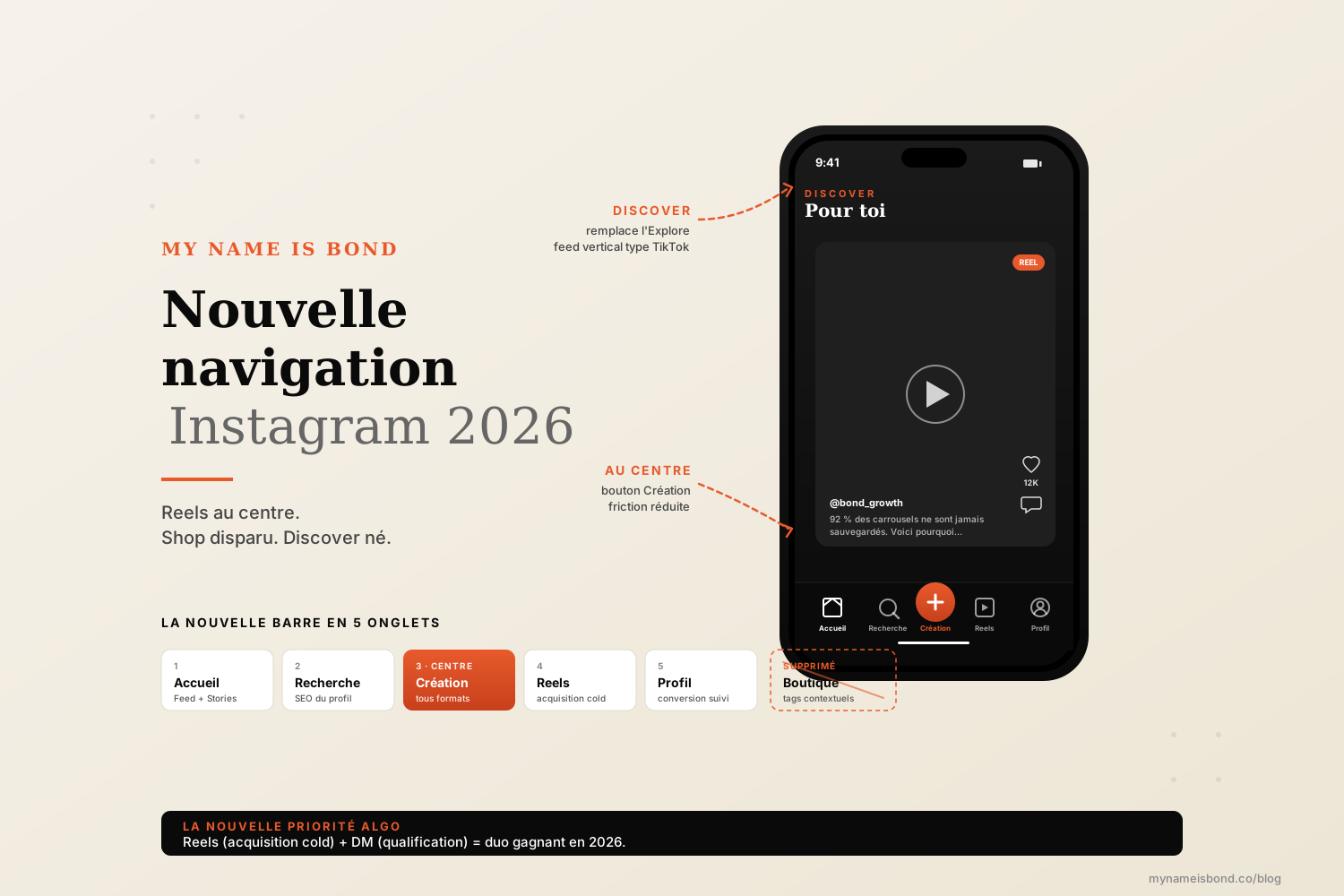
Instagram has redesigned its navigation bar: Create in the center and Explore turned into Discover, while the Shop tab, gone since 2023, has not come back. It is a change of priorities most brands will miss, and here is what it concretely means for your strategy.
You opened Instagram this morning.
Something has moved.
You cannot quite put your finger on it. The icons are not exactly where they used to be. The Shop tab is still gone. Explore looks different. And Reels seem to be everywhere.
That is normal. Instagram has made the biggest redesign of its navigation bar since 2020. It is not cosmetic. Every icon that moved reflects a business priority for Meta, and each of these priorities has direct consequences for your content strategy, your distribution and the way you build your audience in 2026.
This guide gives you the complete new layout, exactly what has changed and, above all, what it means for the way you use Instagram for your brand. Not just news, but what it means strategically.
How the Instagram navigation bar is organized in 2026
Here is the layout you need to know in 2026.
Tab order in 2026:
Home (on the left): your main feed and Stories stay where they were.
Search: the direct search bar to find accounts, hashtags and places.
Create: a new tab in the center, for publishing every format (post, Reel, Story, Live).
Reels: moved just to the right of the Create button, with direct access to the vertical algorithmic feed.
Profile: on the right, your personal or business account.
Putting the Create button in the center is a strong signal. Meta is encouraging users to post more, and more directly. For brands, it means less friction for the team (a single entry point for every format) and a signal that the network increasingly favors creators.
A partly customizable bar.
New in 2026: Instagram lets some profiles (creators and businesses) partly customize their navigation bar. You can replace the Reels icon with a shortcut to your DM inbox, your Insights or your secondary account. Customization is limited to 1 slot out of 5, but it is already significant.
The new social tab in the Reels feed.
When you open the Reels tab, a new filter appears at the top: "Liked by your friends". It shows you Reels your close contacts have liked or commented on. This brings a social layer back to a format that was purely algorithmic. What it means for brands: Reels that get your real clients commenting now automatically reach their circle of friends as well.
The end of the Instagram Shop tab
The Shop tab left the main navigation bar in February 2023, and it has not come back in the 2026 version.
It was one of the most discussed decisions in Instagram's redesigns. Instagram found that the Shop tab was barely used as a main destination. Users preferred to discover products in their feed, in Stories or in Reels, rather than in a dedicated space.
Shopping is not disappearing, though. It is becoming contextual.
In practice:
Product tags are still available in photo posts, carousels, Reels and Stories. Users see a product, tap it and open the product page.
The "Products" tab is still accessible from a brand's profile (not from the global bar). You can still find all of a brand's products by going directly to its account.
"Shop" sponsored ads are replaced by shopping ads built into the feed and Reels, with better context.
What it changes for e-commerce brands.
There is no more direct traffic from a central tab. Product discovery now happens through content: Reels, carousels, Stories and Lives. An e-commerce brand that relied on the Shop tab for passive traffic needs to rethink its strategy: every post becomes a potential storefront, and content strategy now matters more than catalog promotion.
The Discover feed replaces Explore
The Explore tab as we knew it is disappearing. It is replaced by Discover.
The fundamental difference between Explore and Discover:
The classic Explore was a mosaic grid that mixed photo posts, Reels and carousels, in an order that mainly rewarded raw virality. You scrolled, skipped and searched.
Discover in 2026 is a full-screen vertical algorithmic feed. You swipe up and down as in Reels, but the feed mixes every Instagram format relevant to you: mainly Reels, but also photo posts, carousels and even some public Stories. The experience is unified and immersive, closer to TikTok than to the old Explore.
Impact on cold reach (people who don't follow you):
Discover becomes the main way a user discovers your account.
Short video (Reels) has a built-in advantage: it fills the whole screen and is easy to swipe through.
Carousels remain powerful but require reading effort, which lowers their completion rate in this interface.
Simple photo posts lose the most: they are shown full screen but give people little reason to stay.
The strategic conclusion: use Reels to acquire, and carousels to qualify. This split is not new, but Discover makes it more important.
The impact on the algorithm (Reels and DMs prioritized)
The redesign is not just about icons. It reflects and amplifies clear algorithm priorities.
1. Reels are prioritized more than ever.
Putting Create in the center, moving Reels and introducing the algorithmic Discover feed are three signals pointing the same way. The algorithm pushes more Reels than before. If you have no Reels strategy in 2026, you are missing 70% of your potential reach.
2. DMs are becoming more important.
Users spend more and more time in DMs, and Instagram itself says that shares by message are among the most important signals it uses to recommend content.
To learn more about how the algorithm weighs these signals in 2026, we broke it down here: the Instagram algorithm in 2026.
3. The social layer is back (the "Liked by your friends" filter).
The social filter in Reels marks a return to a pre-2018 logic: what your friends like matters. For a brand, this means that comments and likes from highly engaged users have a knock-on effect: their own circles see your content. Social proof is working for you.
4. Long-term engagement matters more than virality.
With Discover as a continuous feed, completion rate and time spent per user become the key metrics, at the expense of the simple like. A 30-second Reel watched to the end by 1,000 people is worth much more than an 8-second Reel liked by 5,000 people but skipped after 2 seconds.
What it changes for your brand strategy
Seven concrete adjustments to make to your Instagram strategy in 2026.
1. Rebalance your content mix.
If you posted 60% photos / 30% carousels / 10% Reels, it is time to switch to 40% Reels / 40% carousels / 20% photos. Reels become your main acquisition format. Carousels remain your qualification format. Keep photos for strong editorial moments.
2. Optimize for Discover, not Explore.
Design your Reels for full-screen viewing without sound (most users start with the sound off), with a visual hook in the first 2 seconds and captions throughout.
3. Invest heavily in DMs.
DMs are no longer a secondary channel. They are one of the two major algorithm signals. Your whole content strategy should start DM conversations, not just collect likes. This is exactly what we set up on client accounts in Instagram growth.
4. Prepare a compliant mass DM strategy.
If your volume of incoming DMs grows sharply thanks to these new dynamics, you need to be able to qualify and reply at scale without triggering algorithm alerts. We structured the complete method here: Instagram mass DM.
5. Rethink your e-commerce strategy.
If you sell products, your catalog is no longer discovered through the Shop tab. Every post becomes a product storefront. Tag products systematically, but without overdoing it (no more than 1 or 2 products per post to keep it readable).
6. Work on long-tail and niche hashtags.
Discover is algorithmic, so your hashtags increasingly help to classify your content (giving the algorithm context) rather than to appear in hashtag feeds. Aim for 3 to 5 precise niche hashtags rather than 30 generic ones.
7. Encourage social interaction on Reels.
The new "Liked by your friends" filter changes the math. Explicitly encourage your real clients to comment on and like your Reels (a CTA in the caption, a mention in Stories). Their engagement brings their circles to your content.
Optimize your profile grid for the 2026 interface
With the Shop tab gone, your profile grid matters more again: it is now the only place where a visitor can get an overview of your visual world and your products.
The new grid rules in 2026:
Visual consistency is essential. Without the Shop tab as a second view, your profile is judged in 1.2 seconds on the grid alone. A tight color palette and 1 or 2 fonts at most are now non-negotiable.
Strategic pinned posts. You can pin up to 3 posts at the top of your grid. Use them for: (1) your main offer, (2) your best social proof (client case, testimonial), (3) your lead magnet.
Clean Reel covers. Reels appear in the grid with their cover. A badly centered cover spoils the grid. Center everything vertically within the 4:5 area visible in the grid.
Alternate formats. Avoid 9 Reels or 9 carousels in a row. Alternate to give the grid some visual breathing room.
Product Highlights replace the Shop tab. For e-commerce brands, create a "Products" or "Catalog" Highlight in first position. It is your new shop menu.
Summary table: adapt your strategy to each area
A summary table to manage your strategy based on the new interface.
Instagram area | Format to prioritize | Strategic goal | Main KPI |
|---|---|---|---|
Feed (Home) | Carousels, photo posts | Qualify your existing audience | Saves, DM shares |
Search | SEO-optimized posts (profile name, alt text) | Keyword discovery | Profile visits |
Create (center) | All formats | Faster production | Posting frequency |
Reels | Reels of 15 to 45 sec | Cold acquisition | Completion rate |
Discover | Reels and carousels | Algorithmic discovery | Views from non-followers |
DMs (inbox) | Replies + compliant mass DM | Turning conversations into a pipeline | Qualified conversations |
Profile + grid | Visual consistency, pinned posts | Turning visits into follows | Follows per visit |
Highlights | Product categories, method, FAQ | Replacing the Shop tab | Clicks and visits |
The accounts that will lead on Instagram in 2026 are the ones that manage all 8 areas at once without mixing up what each is for, rather than the ones that post the most.
FAQ
Do interface changes affect the Instagram algorithm?
Indirectly, yes. The 2026 navigation redesign does not change the algorithm's code itself, but it changes the user behavior the algorithm observes and weighs. There are three main effects: 1. Reels are watched more (central placement, algorithmic Discover feed), which increases their weight in overall distribution. 2. DMs are used more, and Instagram itself says that shares by message are among the most important signals for recommending content. 3. The "Liked by your friends" social filter in Reels (added in January 2025) brings back a layer of social amplification that benefits accounts that engage close circles.
Has the Shop tab disappeared from Instagram?
Yes, the Shop tab was removed from the main navigation bar in February 2023, and it has not come back since. Instagram found that most users no longer used it as a direct destination. But Instagram Shopping has not disappeared: it has become contextual. Product tags are still available in photo posts, carousels, Reels and Stories. A "Products" tab is still accessible from a brand's profile (by going directly to the account). Shopping ads are now built into the feed and Reels rather than grouped in a dedicated tab. For e-commerce brands, every post becomes a potential storefront, and content strategy now matters more than catalog strategy.
What is the difference between Explore and Discover?
The classic Explore (until 2025) was a mosaic grid that mixed photo posts, Reels and carousels in an order mainly based on raw virality. Users scrolled and tapped what interested them.
Discover in 2026 is a full-screen vertical feed, modeled on Reels and TikTok. Users swipe vertically (up and down), and the algorithm serves one relevant piece of content after another, in all formats (mainly Reels, but also carousels, photo posts and public Stories). The experience is immersive and continuous. For your strategy: Reels become the main acquisition format, carousels remain useful but require reading effort that lowers their completion rate in this interface, and simple photo posts are less likely to hold attention.
How do DMs affect a brand's visibility?
Decisively, in 2026. Instagram itself says that shares by message are among the most important signals it uses to recommend content. This weighting reflects a reality: a DM share is an active, personal recommendation, a much stronger quality signal than a passive like. For a brand, this requires two adjustments: 1. Design posts to be shared (useful, exclusive, immediately valuable), not just liked. 2. Build a qualification process in your inbox to turn these shares into conversations, then into a pipeline. In 2026, an account that generates 50 qualified DMs a week is worth more than one that generates 50,000 likes.
Instagram growth
securely and simply.
Save time.
Acquire new customers.
Boost your growth now.