Back
Categories
Instagram Sizes and Dimensions 2026: Every Format
Marion Carneiro
The right Instagram size protects more than image quality: it protects your reach and how people perceive your brand. Here are all the 2026 formats, safe zones and spec tables, a reference page to bookmark.
You post a Reel in 1080x1080 because it is quicker.
And Instagram quietly gives it less reach.
The format is not a technical detail, it is a signal. The algorithm checks whether your content meets the platform's standards. If it does not, it reduces distribution. This is not an official penalty but a quiet trade-off. Your audience reads two signals at once: the quality of the visual and how professional your brand is. A badly sized post weakens both.
This page brings together every up-to-date Instagram format for 2026: posts, carousels, Reels, Stories, profile picture and thumbnails, with exact dimensions, safe zones, maximum lengths, resolutions and spec tables you can print if you are tired of looking them up every time you post.
Bookmark it.
Instagram post sizes (images)
Instagram accepts three aspect ratios for photo posts. All three work, but they do not do the same job.
Square (1:1): 1080 x 1080 pixels
Instagram's original format. Still usable, perfectly readable and neutral. It suits product photos, centered portraits and quote visuals. The downside: it takes up less space in the mobile feed than a portrait post, so it gets less attention while people scroll.
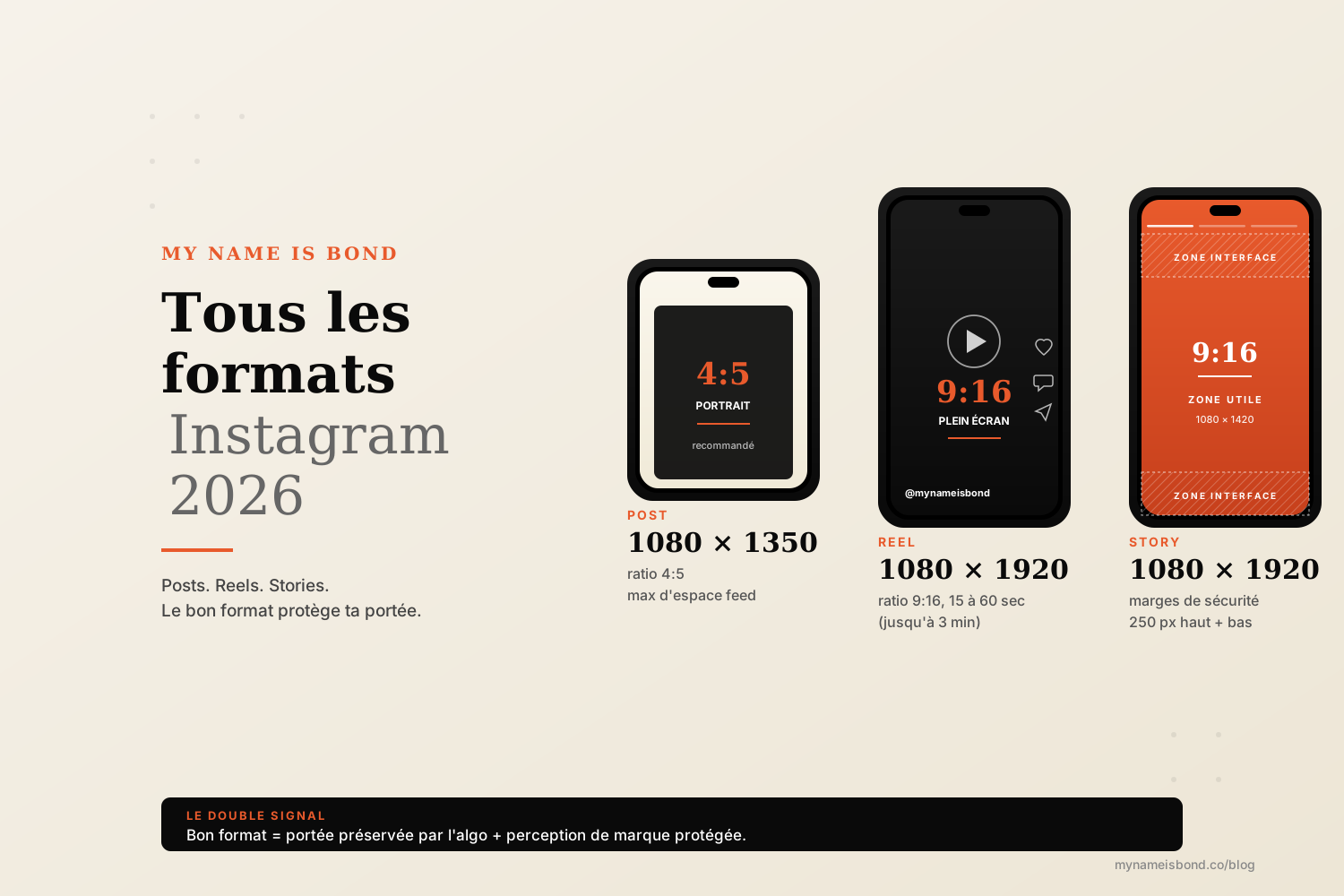
Portrait (4:5): 1080 x 1350 pixels
The recommended format in 2026 for most posts. It takes up the maximum vertical space Instagram allows in the feed without cropping. More space means more attention and more engagement signals. It is the default format for carousels, editorial posts and visuals with built-in text.
Landscape (1.91:1): 1080 x 566 pixels
The format to avoid in 90% of cases. It is too small in the mobile feed, with empty bands above and below, and has little presence. Keep it for specific cases: panoramic photos or horizontal infographics meant to be reshared across platforms. Do not use it by default.
Carousels. All three ratios above are available. Every visual in a carousel must share the same ratio. Otherwise Instagram crops automatically and you lose control over the composition. A carousel can contain up to 20 slides since the 2024 update.
The habit to adopt: 1080 x 1350 in 4:5 by default, and only change it when you have a real reason.
Instagram video and Reel sizes
Reels dominate distribution on Instagram in 2026: vertical, full-screen video is the app's standard format. The format is not negotiable.
Reel: 1080 x 1920 pixels (9:16 ratio)
This is the only format that fills the entire mobile screen. Any other ratio is cropped or surrounded by black bars, which immediately makes the video look low quality. A square or landscape video posted as a Reel looks like content imported from somewhere else, and the algorithm picks up on this and reduces reach.
Length. Since January 2025, Instagram has extended the maximum Reel length to 3 minutes. In our experience, 15 to 60 seconds is still the easiest length to get people to watch to the end. Beyond 90 seconds, completion rate drops sharply, and reach drops with it. Only go longer when the topic justifies it (tutorials, in-depth storytelling).
Regular feed videos (not Reels). Still possible, but marginal in 2026: Instagram systematically pushes videos through Reels. If you post a video in the feed, stick to 1080 x 1350 (4:5) for consistency with your photo posts, or 1080 x 1920 if you want it treated as a Reel.
Technical specs:
File format: MP4 or MOV
Recommended video codec: H.264
Audio codec: AAC, 128 kbps minimum
Frame rate: 30 fps recommended
Bitrate: 3,500 to 5,000 kbps for the best quality
Maximum file size: 4 GB
60 fps is accepted but often pointless: Instagram recompresses to 30 fps for most devices, so there is no need to make the file heavier.
Instagram Story size
Stories use the same format as Reels, but with one feature that changes everything: safe zones.
Story: 1080 x 1920 pixels (9:16 ratio)
Full-screen vertical. This is the only Story format. Any other size is cropped or shown with black bars.
Safe zones: the rule that changes everything.
Instagram overlays interface elements on your Story: your profile picture and name at the top, reactions and the "Send message" field at the bottom. If you place text or an important element in these areas, it will be hidden.
The safe zones to respect:
Top: 250-pixel margin (your name, profile picture, the clock)
Bottom: 250-pixel margin (reactions, "Send message")
Usable central area: about 1080 x 1420 pixels
In practice, all your important visual content (text, CTA, stickers) must fit within the central 1080 x 1420 rectangle. The rest can be decorative (background, color), but should never carry information.
Length. A Story video plays without being split for up to 60 seconds. A video of 60 seconds or less plays in one piece; beyond that, Instagram splits it into several segments.
Stickers, polls, questions, GIFs. Instagram places them automatically within the safe zones. If you add text manually, managing the safe zones is up to you.
Profile picture and thumbnail sizes
These are the permanent visual elements of your profile. If they are badly sized, they hurt your credibility before anyone reads your bio.
Profile picture
Recommended upload size: 320 x 320 pixels minimum, 1080 x 1080 ideal
Display on mobile: 110 x 110 pixels, as a circle
Display on desktop: 150 x 150 pixels, as a circle
Format: JPG or PNG
Visible area (circle): 90% of the uploaded square. Anything placed in the corners will be hidden by the circular crop. Center everything that needs to be readable.
Reel covers (cover photo)
When your Reel appears in your profile grid, Instagram shows a thumbnail. You can choose this thumbnail when you publish.
Cover size: 1080 x 1920 pixels (9:16)
Visible area in the grid: a centered vertical rectangle (about 1080 x 1440 pixels, 3:4), since the grid switched from squares to rectangles in January 2025
In short: the text on your cover must sit in the vertical center, or it will be cut off in the grid
This is the most common mistake: a Reel cover that looks perfect full screen but is unreadable in the profile grid. Center everything.
Highlight covers
Size: 1080 x 1920 pixels (you upload in 9:16)
Display: a circle of about 110 x 110 pixels
Visible centered area: a circle of roughly 610 x 610 pixels in the middle of the visual
Recommendation: create your highlight covers at 1080 x 1920 with your icon or text centered inside a 600-pixel circle
Thumbnails in the profile grid
Since January 2025, the profile grid shows your posts as vertical rectangles (3:4) instead of squares. A 4:5 post (1080 x 1350) is only trimmed slightly at the sides to create the thumbnail, while a square post loses more at the left and right. Keep important text and elements away from the side edges so every post stays readable in the grid.
Instagram dimensions summary table
The table to print or bookmark.
Content type | Dimensions (pixels) | Ratio | Notes |
|---|---|---|---|
Square post | 1080 x 1080 | 1:1 | Original format, neutral |
Portrait post | 1080 x 1350 | 4:5 | Recommended by default |
Landscape post | 1080 x 566 | 1.91:1 | Avoid (except specific cases) |
Carousel (up to 20 slides) | 1080 x 1350 | 4:5 | Same ratio for every slide |
Reel | 1080 x 1920 | 9:16 | Up to 3 min (since January 2025) |
Feed video | 1080 x 1350 or 1080 x 1920 | 4:5 or 9:16 | Depending on use |
Story | 1080 x 1920 | 9:16 | 250 px safe zones top and bottom |
Reel cover | 1080 x 1920 | 9:16 | Visible area in grid: 3:4, centered |
Profile picture | 1080 x 1080 | 1:1 | Shown as a circle, 110 px |
Highlight cover | 1080 x 1920 | 9:16 | 600 px visible circle, centered |
Bio | 150 characters | n/a | Profile name: 30 characters |
Optimization tips
The right format is not everything. Display quality also depends on resolution, file size and codec.
1. Minimum resolution: 1080 pixels wide.
Instagram will not display in high definition any visual uploaded at less than 1080 pixels wide. Below that, your content is served in low resolution, even on a screen that could show more. This is where most quality is lost.
2. File size.
Image: 30 MB maximum per file. In practice, stay under 8 MB to preserve quality after Instagram's recompression.
Video: 4 GB maximum, but aim for 100 to 250 MB for a 60-second Reel in 1080p.
File format: JPG or PNG for images, MP4 for videos.
3. Plan for Instagram's recompression.
Instagram recompresses every visual you upload. Your 15 MB PNG becomes a 1.5 MB JPG after upload. This recompression always reduces quality, especially on gradients, dark areas and small text.
To limit the loss:
Export in sRGB (not CMYK or Adobe RGB)
Prefer JPG at 80 to 90% quality over PNG: the recompression will be less aggressive
For text, use a bold font of at least 32 px: anything smaller looks blurry after recompression
Avoid subtle gradients: they will show banding
Never upload an image below 72 dpi
4. Video: codec and bitrate.
Video codec: H.264 (more widely supported than H.265)
Audio codec: AAC, 128 kbps minimum
Video bitrate: 3,500 to 5,000 kbps for a 1080p Reel
Frame rate: 30 fps (60 fps is unnecessary in 95% of cases)
5. Safety margins.
Leave a 100-pixel inner margin around every important element. Instagram may crop slightly depending on the screen, and text placed against the edge disappears more often than you would think.
Why the right format protects your reach and brand perception
This is the angle most articles about Instagram formats never cover.
The format is not just a technical detail. It sends a double signal: one to the algorithm and one to your audience.
The signal sent to the algorithm.
Instagram prioritizes content that meets the platform's standards, because it delivers a better user experience (full screen, smooth viewing, no awkward cropping). A Reel posted in 1:1 instead of 9:16 shows black bars over half the screen. Users swipe away faster, Instagram detects it and pushes the Reel less.
It is not an official penalty, just a quiet trade-off. But over 50 posts a month, the gap adds up to thousands of lost views. For more on how the algorithm weighs these signals in 2026, we covered it here: the Instagram algorithm in 2026.
The signal sent to your audience.
People notice a badly sized post immediately, often without realizing it: a pixelated visual, cut-off text, a Story whose CTA is hidden behind the "Send message" button. Users do not think "wrong format". They think "unprofessional brand", and they keep scrolling.
This is especially true for professional accounts and B2B brands. A badly centered Reel cover, a cropped profile picture or Story text that spills into the interface area is enough to lose a prospect who was considering following you.
The right format goes unnoticed.
That is exactly what makes it effective: a clean format does not draw attention to itself. It lets the content speak and does its job quietly.
If you want to see how we build this format work into a complete Instagram growth strategy (content, distribution, qualification), see here: Instagram growth. And for brands that want to go further on the narrative and emotional side of their posts, we broke it down here: the secrets of Instagram storytelling.
The right format protects both your reach and how your brand is perceived, so take care of it.
FAQ
What is the best size for an Instagram post in 2026?
The best size for an Instagram post in 2026 is 1080 x 1350 pixels in portrait format (4:5 ratio). It takes up the maximum vertical space allowed in the mobile feed without cropping, which maximizes visibility while people scroll and the engagement signals you receive. The square format (1080 x 1080, 1:1 ratio) is still usable but offers less space. The landscape format (1080 x 566, 1.91:1 ratio) should be avoided in most cases, because it is too small in the mobile feed.
What size is an Instagram Reel?
The Instagram Reel format is 1080 x 1920 pixels at a 9:16 ratio (full-screen vertical). It is the only format that fills the entire mobile screen without black bars or cropping. Any other ratio immediately lowers perceived quality and reduces reach. The maximum Reel length has been 3 minutes since January 2025. In our experience, 15 to 60 seconds is still the easiest length to get people to watch to the end. Beyond 90 seconds, completion rate drops sharply.
What size is an Instagram Story?
An Instagram Story is 1080 x 1920 pixels at a 9:16 ratio. Watch out for safe zones: Instagram overlays its interface at the top (your profile picture and name, 250 pixels) and at the bottom (reactions and the "Send message" field, 250 pixels). The usable central area where you should place all your text and important elements is about 1080 x 1420 pixels. A Story video plays without being split for up to 60 seconds; beyond that, Instagram splits it into segments.
Why do my photos lose quality on Instagram?
Three main causes explain quality loss on Instagram:
Insufficient resolution. Below 1080 pixels wide, Instagram will not display in high definition. Always upload at 1080 pixels minimum (1080 x 1350 for a portrait post, 1080 x 1920 for a Reel or Story).
Color space. Export in sRGB, not Adobe RGB or CMYK. Instagram handles other color spaces poorly, which degrades colors.
Automatic recompression. Instagram recompresses every visual you upload. Prefer JPG at 80 to 90% quality (rather than PNG, which is recompressed more aggressively), and avoid subtle gradients and text smaller than 32 pixels.
Also check your connection when uploading: on a weak network, Instagram may upload a low-resolution version without telling you.
Instagram growth
securely and simply.
Save time.
Acquire new customers.
Boost your growth now.